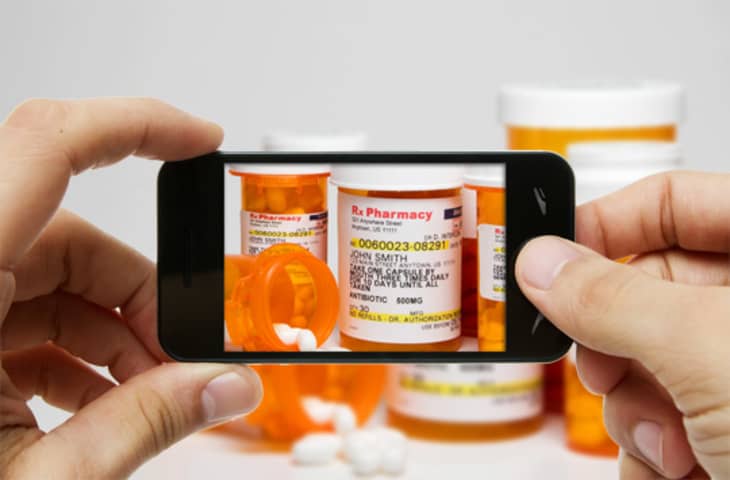
Have you ever forgotten the name of a prescription? What about the measurements of your air filter? Thanks to the ubiquitous nature of smartphone cameras, it's now possible to carry around your entire life (well, at least a 2-D version) in the palm of your hand.
You might already use your email or notes apps on your smartphone to keep track of little everyday reminders. But your camera app and photo album can be just as useful as a memory aid.
Here are a few things that can easily be remembered with a quick snap of your camera phone's shutter button:
• A reminder of where you parked. Parking in the city is no joke.
• Your printer cartridges. Make sure you can see the refill numbers.
• Your family members' clothing sizes.
• The measurements of your air filter.
• Travel confirmation numbers. Take a screenshot of the email your airline sends you. When you check in later and need to find confirmation numbers, your photo album will be less cluttered than your inbox.
• Pictures of current medications. Make sure you can see the prescriptions' names and dosages in the photo.
• The types of lightbulbs that fit your home fixtures.
• A recipe from a book or magazine that you want to use soon.
• Anything "borrowed" that you might want to buy later, like the brand of a smooth-writing pen at the bank or a great-smelling hotel shampoo.
• Expensive home furnishings you just know you can DIY at home. Get shots of all the important angles for when you're ready to DIY.
Do you have any other suggestions? We're sure you smart folks can think of plenty more ideas for photo reminders to leave stored on your smartphone. Please leave a comment and share it with everyone!
MORE ON REMINDERS AND AIDS FROM APARTMENT THERAPY:
• How to: Remember Where You Park
• 5 Handy Numbers and Measures to Store in Your Phone
• Top 10 Ways to Remember Your Resuable Tote
• How to Remember if You've Turned the Stove Off
(Image: Composite from Shutterstock images [1,2])
Re-edited from a post originally published 5.2.12 - JL

Stanley Console by ...
great ideas, I also like keeping a dry erase or chalk board in the kitchen to write down stuff you are out of when you realize it, then instead of transcribing just take a picture.
Greta idea! I love it! Don't forget to secure confidential data.
I keep a photo of my license plate in my phone.
I take photos of books that I'd like to purchase in the future or check out at the library.
I photograph stuff I want to buy or that my kids say they want. Sometimes we'll go "free" shopping and take photos of all sorts of toys.
I also take pictures of books I want to read. One thing I do is take a screen shot on my phone of ingredient lists, coupons (they can scan the bar code from the picture), or whatever I'm looking for (a dress on pinterest, etc) for easy access while shopping. To take a screen shot on an iPhone, press the Home button and the Screen Lock button simultaneously.
When clothes shopping, I take pictures of myself in the clothes I try on to help me make a decide between options as I'm shopping around.
I have my kid's ssn disguised as phone numbers. I've memorized mine and husbands, but have not been able to commit theirs to memory. Plus husbands's drivers license number.
Pictures of labels from wine bottles that you tried and loved.
I do the same as Amandarh, scribble shopping lists on my chalkboard and photograph it. I also photograph shoe options when I'm in DSW, that way I don't have to walk all over the store trying to remember which pairs I liked best.
I keep photographs of rooms in my house if I'm shopping for a certain item.
Love the license plate idea. The possibilities are endless.
I second the license plate photo. I needed the number at the BMV and had no pen, snapped a pic instead and kept the photo. Months later my husband needed the number at work so I sent him the pic in a text and voila, how useful! :)
Great ideas! But to keep them all organized put the pics in Evernote!
I'm about to take photos of the books I already have, because I have a tendency to notice the same books I already have when I'm at a used book store, but can't remember if it's something I wanted or already have (and yeah, I have too many books!). ALSO - and this could save people a lot of $$ - your room measurements at home and/or photo of your floor plan. You may want to get a piece of furniture on a whim and think it will fit, but we typically remember our spaces differently than reality, and furniture looks a lot different size-wise when in a large showroom.
Instead of searching for paper and pen i took pictures of the ingredients of a nice recipe listed on tv screen...
Price labels of items in stores, especially electronics: Stores play the game of carrying slightly different models of electronics, and when you are trying to price compare & get a better deal at a competing store that says they will match the price, you need to show them that it's the same exact model they carry.
Also, save a website as an icon on your phone when a company's website has a better price than the in-store - then when you're at the store, you can easily show them, and they will usually honor the price on their web page.
And, these days, with retailers competing for our precious dollars, don't be afraid to do any of the above! The old days of bartering are back, and it's great. I just got a discount at the Apple store, of all things, for mentioning that I'm a student.
Yes to car tags and a photo of the car. Even in the VIN if you can get a good shot of it, which is not easy to do. Also pets and their vet tags.
Also---partially related: when I worked as a photographer (using film), I would use my first or last exposure to identify the film. I'd write the name(s), date, and occasion on a piece of paper and photograph it. If I took individual photos of a collection of kids---say team soccer photos---then I would have each child write his/her name, parents' name, and phone number on a piece of paper and hold it down at arm's length. I would include it in the image, but would crop it out for publication. This saved me a lot of headaches.
When covering football games, if the play I shot resulted in a touchdown, I would take a photo of the score board which would help me identify the shot and coordinate with the reporter covering the game. And I would take a photo of the scoreboard at the end of each quarter to help identify other plays during the quarter. This works for all sports but you have to be quick.
Using digital imagery is less complicated, but the ideas are still useful.
I shoot my mileage plus, car rental, and other perk program cards with membership numbers. Also our company conference call # and pass codes, as it can be easy to forget my moderator code moments before I'm supposed to call in.
Meeting agendas and menus to text to latecomers (e.g. here's what you're missing, and can I order something for you?)
If I'm trying to get advice from Mom or Dad about cooking or something up with the car, I'll sometimes remember to just send a pic in the midst of my long explanation - and when Dad calls with computer questions, I try to get him to do the same thing.
A reminder where you parked is awesome! I'll definitely use that one.
on mine:
+ photos of exercises from Face Fitness book, so that I can do them when I'm not at home.
+ photos of playlists that I like from other iPhones/iPods
+ photos of items in my apt I need to sell (take a pic as you clean)
Keep a photograph of your passport identification page in your phone.
These are great ideas. We take photos of the stockroom info tags at IKEA. I also have measurements for furniture etc but in the notes section of my phone (not all info is visual).
Agree with wine labels!!!
I always take pix of my family's passports & health card info when we go on holiday...that way if they're ever stolen, we have the info.
One useful idea I got from another blog was to take your kids photos when you are going out so that if (hopefully never) get lost you can just show the picture to the police so that you won't have to remember what he/she was wearing that day.
I'm doing a lot of projects around the house before our next baby is born, so I have lots of pix of rooms/areas I'm working on. Otherwise it's hard to remember exactly the configuration of a room, or the mix of colors, or the way doors open, etc., when I'm at the store getting supplies. I also keep notes of all the measurements I'm using (frame sizes, curtain lengths, furniture sizes/colors needed, etc.). I also take pictures of things I'm going to frame so I can look at those pictures while at the store and make the best match for the piece I need to frame, which is especially handy for paintings. And I take pictures of a room during different lighting situations, or edit them in paint apps and try out different colors (pillows, curtains, etc.). And if I see something online I like I'll save the image so I can refer to it later.
A great app for keeping running shopping lists is Shopper. I have numerous running lists for each store I go to, so when I think of something I need, I just enter it in Shopper. Then later on when I'm at the store I have a list of all the things that I need to get. It's better than carrying around scraps of paper (although I still occasionally do that for a quick run to the grocery store). The only thing is you have to remember to actually put the stuff you need on the list. Sometimes I think of something but instantly forget to put it in Shopper, and end up having to go back to the store.
Second the comment about keeping everything in Evernote. It'll still be there, accessible no matter how you access the internet, if something happens to the phone. I use Evernote constantly.
I do a poorman's version of this, entering text-based info into the "Notes" functioning on my non-smart phone.
- library card
- blood type card
- favorite socks package
- life insurance card
- info typed in huge bold letters on computer screen (new doctor address, bank account number I have to deposit in, etc)
- taxi drivers business cards
- hair color boxes (with shade numbers)
- businesses hours (when available on their doors)
- crossword puzzle magazines (they´re for somebody else)
- infrequently published newspapers
- favorite yogurt lid (different color for different flavors)
- currently used detergent (I like to vary)
I am sure there are a million solutions to this problem, but does anyone have a good way of storing PIN numbers and security passcodes in a phone where they can't be easily identified as such?
I have a snapshot of my wallet opened, showing just enough of each card so I could identify what cards are in there in case it ever was stolen and I had to call the CC companies.
I have business cc's and membership cards, there are quite a few items I'd feel upset losing even if I don't use them every day. Plus all the ones I do use everyday.
I have a photo of the subway line of Paris, next time I travel to Tokyo, I will have this one too.
Otherwise, love to take a shoot of a book on bookshop, but after that I write it down on the Note apps. That way I've just 1 list to check
I use the "notes" or "notepad" feature on my phone. Uses less memory, and easily categorized - not to mention I could use code which makes something sensitive more secure.
I have also started keeping stuff like this in evernote, I even take shots of recipes, so much faster than writing stuff down and then I can just look at the store. I also save plant tags. Dropping a pin is great when you park, than you can navigate back.
i use a credit union in san francisco that only has a few branch locations and, until recently, only a few ATMs. a couple of months ago, they began putting new ATMs in many of the walgreens around town and had a easel board setup in the bank branch with a list of locations. i snapped a photo of it, so now i know where all the most convenient ones are to me when i'm walking around town!
When traveling to a country where the language is too different from mine, I take pictures of the hotel, street name, toilet bowl, food, etc.
@51desks: I gave all my cards-with-pincodes "names" and included the pincode in the phone numbers attributed to those names in my contact list. Only I know what I call them, but, just in case, only I know which four digits of the 10 in the # are the pincode ones.
It's come in handy a few times already, though there's only one I always seem to forget. :-).
+1 on using the camera in concert with Evernote.
Realizing that the camera is faster and more accurate than taking notes has been a real change in my world.
Things I capture:
Books, TV ads, Billboard/sign info, receipts, mileage counters, menu info, ingredients, rental car condition at pickup/dropoff, store prices for comparison, vitamin/supplement containers, home improvement ideas, business cards, gadget ports/cable plugs, clothing size/model numbers, gadget model/serial numbers, printer cartridge info, wine labels (I can never remember that stuff), doodles, cable placement on audio/video gear before unplugging anything, the possibilities go on and on...
The combination of a camera phone (Android in my case) coupled with an App called Camscanner which lets you capture anything in a photo and turn it into a PDF file instantly, then send it to my Evernote account which has OCR, allows me to search anything I save for any word in the capture, this means no more writing/typing business card info.
It's a great setup.
Wine labels, if I'm at a party and really like the wine. I'm not sure about the clothing sizes suggestion...there's a notepad app for that.
I only snap pics of clothes if I want my mom or sister to weigh in on what they think.
When walking through the bookstore, I take photos of any books I may want to check out from the library. Later, I add these to my goodreads list and delete the photos.
Is this not Apartment Therapy??? Unless I missed it, nobody mentioned the obvious one I always do -- take pictures of furnishings I am thinking of getting (ideally with price tag showing) to run past my partner for second opinions. (Also things I just like but am not ready to commit to yet.)
I agree with the Evernote comments. Something that I haven't seen mentioned yet is that you can encrypt portions of the text of a note in EN, which will help protect things like SSNs and PINs. I also use KeePassDroid on my phone and tablet, and KeePassX on my desktop. KP is able to store and encrypt lots of text-type data, though it's primarily for usernames and passwords; but you could put SSNs or PINs into the comments of a KeePass entry, perhaps with the web URL and login info for the site which provides the card or whatever.
I put my encrypted KeePass DB into my Dropbox and mark it as a favorite file in the DB app on tab/phone, so it always keeps the current version available on my devices (any changes I make to the file on any device are updated automatically to the rest). KP can use 2-factor logins, so I have a password and a keyfile. I store the keyfile on the phone and tablet in a hidden folder (not in Dropbox) in order to be able to unlock the KP database. If I lose either mobile device, I can simply generate a new password and keyfile for the database, rendering it useless on the device even when DB syncs the file.
I wonder about two issues. First, is this a security risk? If your phone is lost or stolen, it seems like people would now be able to so easily access all kinds of information (where is your unattended car right now? What's the refill number for the controlled substance you're taking?).
Second, won't it be hard to search for the info at a later date? I tend to keep important information in my Gmail or Google documents because it's searchable. When I needed a new furnace filter last week, I just searched my email and it popped right up in an email to myself. If I had just snapped a photo, I would have had to scroll through photos until I came across it.
Storing info in your email also addresses my privacy question above, because if I realize my phone is gone, I can log into my accounts on another device and change my passwords to lock people out of accessing those accounts on the missing phone.
@51DESKS, I keep that info in my email as well, but not the full PIN numbers/passwords. I just write down the first letter or number, and that's enough to prompt me to remember the rest. If I see that my bank PIN starts with 1, I just automatically know the rest.
One thing I recommend is to put your ICE information on the lockscreen of your phone.
That way, if you're in an accident, and you're incapacitated, someone can easily get to your ICE info. What good is ICE info on your contacts when someone else can't access it in an emergency situation.
I have a picture of my driver's license in my album. That way, I can whip it out in case I forget my wallet.
I also take pictures of recipes, and google docs will automatically convert it to text. I also scan barcodes for books, video games, anything that catches my fancy, and store that into Evernote or Catch for later use.
I have a fantastic app called "My Measures." You take a picture and then you add measurements. Thus, I always have the measurements of my windows and cupboards and counters and rooms, fireplace surrounds etc. with me.
My boyfriend and I both swear by our "mSecure" apps...it saves EVERYTHING in one place, although not visually. You can store web logins, airline mileage membership info, license, passport, credit card, and bank account info to name a few. It's all password-protected and can be backed up by desktop or by email. We were looking for something to replace the Blackberry Password Keeper when we switched to our iPhones...can't tell you how handy it is with all of the different logins we have and much easier to make travel arrangements by having both of our info handy!
I take pictures of shoeboxes so that I know the names and sizes of shoes that I have purchased just in case I want to buy a new pair of shoes of the same type as the old one wears out or in a different color.
When I was at an art fair, I took pictures of all the pieces I was interested in, and took a second picture of the artist/price. That night I looked through all of them so when I went back the next day, I knew which booths to go back to first. I also take pictures of pillows/couches, etc. when shopping, but that happens rarely.
I'm weird in that I have a secret writing language leftover from lower school, so I write down many of my passwords in the secret language, take a picture, and add that to a Passwords note in Evernote. It's easy to find, but only I can decode it.
I keep a photo of the WEP Key for wireless at home for visitors. Also, I had a minor accident during rush hour in the left lane with no shoulder on I 95 in Miami on the way to my husband's chemo treatment.. I pulled out my phone to document the damage and swap insurance and license info and we were on our way. It took less than two minutes and we were off and moving. No longer in danger of a much more serious situation. I also keep a photo of the ever changing monthly class schedule at my local spa.
I take a picture of my car mileage every time I change my oil.
Passport picture for frequent international travelers.
Thanks for the helpful ideas!
We recently had an issue with our new-ish laundry pair. Sears asked me for the serial number but it was locked inside the still-full washer. I made a note to snap a pic of all of my appliances as I usually make my calls from the office.
I also second the pictures of wines we enjoy at parties, etc.
Hi, Technut!
I have this too:
"cable placement on audio/video gear before unplugging anything"
BUT on the computer, not on the cell phone.
Hi, Aligee!
I have done this too:
"Wine labels, if I'm at a party and really like the wine."
Hi, Akay!
"Second, won't it be hard to search for the info at a later date?"
I keep a copy of the photos on the computer and on pen drives.
To go along with IKEA stops, I have a picture of the dimensions of my tailgate on my car. This way I know what I can fit, and what I'll have to use a truck/van-favor on.
Hi, Lisa416!
"snap a pic of all of my appliances"
I needed to buy a new blender pitcher
and the clerk asked me for the blender make,
which I couldn´t remember :-(
Now I have a picture of all appliances manufacturers logos
(on the computer; when I need, I bluetooth to the phone).
@JuliannTrott When I was in San Francisco the BART website had pictures you could download onto your phone that included maps of the system, as well as a time table. It was so helpful having those pictures on my phone. The timetable especially, since I could look it up before getting to the station, and seeing that we either had to hustle to make our train, or we just missed it and had time to stop somewhere else first.
for the Book Lovers that I see posting on here, I highly recommend using an app like iBookshelf. You can enter the books you want by ISBN, or barcode scan, or heck even photo. It will handle physical books or even ebooks. Currently I have my entire library in there, 1,241 and counting. Save your photo space for something more important
Timetables of public transport is a great one here in Holland, although I realise it may be less useful in other countries.
I take a lot of pictures of tags on clothing, bar codes, product info etc. A lot of times when you find something in a store you can find it online for cheaper. Ive found a lot of stuff for a fraction of the price online, exact same brand, style etc
@ JAVANREE: Yah, we've got something even better in many US cities- we can see where the bus/subway actually is "live," via GPS, not just the timetable.
Great ideas. I take photos all the time to prompt and remind me. My girlfriend wrote some notes in her Iphone, then took a photo of them with my Iphone so I could remember. She could've sent them to me via email but thought this was a better way.
I also keep my bank account number in my phone because I'm always needing that.
Love all the different ways people use their phone for storing important information.
When I'm travelling to other countries roaming is SO expensive that I don't use the data on my iPhone. Instead, I use google maps to route directions from one place (like my hotel) to another that I need to go on the trip (like a restaurant or attraction). Then, I screenshot that route with iPhone so it saves to the photos section of my phone and is accessible offline.
Us Canadian's have to get crafty to save on our cell phone bills :)
I took pictures of all my credit cards, front and back, and store them in a "locker" app in my iphone. Whenever Im buying something on the internet I dont have to take out my wallet, just take a look at the pic. Also I just lost my wallet and it was waaay easier to report the missing cards.
ya.....this is obvious to one of ordinary intelligence and how i remember the make and year of delicious wines. m
We don't own a car, so when we rent, we take a picture of the car and its license plate--that helps us when we're checking in at a hotel and need to register the car, not to mention finding it when we have forgotten what the car looks like!
Coat check tickets (especially if you plan on drinking...)
Also, as mentioned, books I may want to read/purchase in the future.
Rather than photos, I do a lot of this with word/text files on DropBox.... one file and it auto synchs to my work pc, home pc, iPad, and my phone. It makes the drug details much easier to read.
But, that's not to say that I haven't take pictures in Pottery Barn or Restoration Hardware... then gone to the consignment shop :-)
For the following, make sure you use a photo app that has a time/date stamp feature:
- Snapshots of anything before you rent (car, moving van, equipment, etc) will provide a better backup than the written description of any damages.
- I temporarily switched a company car for another and mine was damaged when I got it back- next time I'll take photos before I hand it over. Same goes for dropping at garage.
- Dry cleaning before you drop it off- you can either locate a preexisting stain to make sure it's gone, or prove that a new stain is, in fact, new.
Basically, you can document the condition of anything you hand over to someone else or anything that you take possession of and will then be liable for.
And the fun stuff:
- Close-up shots of colors I'm trying to match while out shopping- works for clothes and household items.
- IKEA stock info, no golf pencil required.
- Haircuts I like, so I'm not trying to speak to my stylist in a language only she speaks.
- Beautiful flowers (date-stamped) so next season at the garden center I can remember what's blooming when. Way more accurate for your time-zone than a plastic tag.
- Nutrition labels, if I'm tracking and away from home. Same for the digital readout on exercise equipment.
- Recording a recipe at a friend's house.
- The order of anything to be disassembled and later reassembled.
- The contents of my friends' medicine cabinets and underwear drawers. (Just kidding!)
- Etc... A note of appreciation to this amazing technology... remember when every 35mm frame was precious?!
-
On a summer car trip through some very remote areas of New Mexico and Colorado, we correctly assumed we'd see a lot of "No Sevice" on the phone screen so we took screenshots ahead of time of the map, directions we'd be needing through these dead areas and referred to them many times. Since no one travels w paper maps anymore, we'd have been in big trouble trying to find all of those hidden mountain passes.
A lot of great ideas here. The problem with using things like Evernote is if you have a poor or no network connection, you cannot get to your info easily or at all. So, some important things stored locally on your phone, make good sense.
I'm new to Android, but I thought you can always access Evernote? Even offline? I just turned my phone on Airplane Mode and can still access Evernote just fine.
I take pictures of each room in the event of a fire or other disaster
Even theft for insurance purposes
I keep a photo on both my phone and my plain old digital camera of a piece of paper that says "If found contact..." with my name and phone number. If you lose your regular camera, whoever finds it can call you. If they find your cell phone, and can access your photos, you'll hopefully have been thoughtful enough to provide a phone number that is NOT your cell phone so they can reach you. ;-D
before i leave the house for a trip, i take a photo of my stove in the "off" position for those moments when i freak out, wondering if i left it on... yes, it's nutty...
i like to keep my best "selfie" shot for quick updates to my facebook profile.
@51DESKS
I always put pins in as address with the name as the company the pin is for. If my pin was 1234 I put under address
1234 North Presidential Ave Ny NY.
I categorize my pics in separate albums on my iPhone in order to keep them organized and save me from searching through the whole library. I have one album for my makeup-- taking pics of the makeup and the names and shades make it easier when I'm shopping.
I've been doing the "where did I park?" thing since before I had a cellphone...we visited friends overseas and they loaned us their car. I was so afraid of "losing" it in St.-Emilion's twisty roads that I took a picture of the area to show people if/when I got lost. (Ironically, that was the best picture I got of the town's ridgeline...)
Another digital camera trick - Friends & I take a lot of museum photos for research. We now take a picture of the object immediately followed by a picture of the information tag.
I would hesitate to put too much personal identification in my phone, since it's not password-protected. I regularly lose my phone out of a pocket....so far it's always come back.
I keep pictures of the business hours for places I go to occasionally but have funky hours (I also live in a small town), like the library, post office, etc. I also don't yet have a smart phone, so this may not come so much in handy with internet access :)
Also, I love the "oven off" idea, I will definitely use that!
I have a picture of my VIN number .. I've needed it many times when dealing with car issues!
Photo of oven in off position is AWESOME!. My wife and I are always afraid we left the garage door open when we leave for trips. Just need to remember to delete the old photo when you return home.
I'm always taking photos of things at stores, especially home improvement stores. Helps to be able to reference dimensions during planning.
I also have CamScanner on my phone but haven't played with it yet. Need to do that. Thanks for the great ideas!
ill write down a shopping/to do list throughout the day or week while at work on a post pad, then before i leave, i snap a photo and put it as my screen saver. instant list that i can not lose or misplace!
This is so helpful. A few other images of items I keep in my phone that have come in handy are:
• my car's vin number and license plate (accessed these many times)
• labels of wines I enjoyed. (comes in handy next time you're at BevMo)
• nail polish names/labels (great for manicures or buying your own)
This is the best post ever on AP!
@EVIN
Really? You think you should take a picture of your kids everyday to remember their outfits in case they get kidnapped? Wow.
This is great. Lots of good ideas! Here are a few things I take pics of:
-Inspiration, like potential DIY projects, landscaping ideas, cute outfits, etc....
-Favorite restaurant menus, for later when I want to place a to-go order.
-Appointment cards with time and date.
-Grocery list.
-Recipes.
-Newly purchased items, in order to remember to look for a matching accessory or pair of shoes...
-Oh, yeah! We recently painted several rooms in our house. I took a pic of the color mixture before the can got messy, in case we needed more!
Pictures of the pads/tampons or makeup/hair products you use. Very helpful for when my husband is at the store picking up some things after work and I'm not with him. I also have a problem with remembering the exact shade of my coverup/lipstick/blush, so a picture is really helpful
Great idea. My problem is I take the picture but still forget that I have taken it.
@Evin
@Georgiazee
My mother is 80 and I take her photos when we are
"going out so that if (hopefully never) she gets lost
I can just show the picture to the police
so that you won't have to remember what she was wearing that day"
(OK. I AM fond of "Without a trace")
@AAAKid
I agree entirely!
Take pics of wedding info: like wedding ideas, plannings ,dresses, shoes, jewlery, churches, guest list,presentaion of food,cakes,tux,hair styles,ideas for favors in magazeines so u dont have to buy the whole book,table settings, flowers. Im sure there is more also.
Haha, I used to do this before I had a smart phone. I'd take a screenshot of the Google map directions of where ever it was I needed to go, and then pretend my phone was smart...
Real smart phones are easier though. I also do this to compare prices of products I regularly buy at different stores.
i have a separate folder of pics of all my rooms, appliances, and closets (including computer serial numbers) - i've been robbed once and carry renter's insurance - but thought in the event of some mishap, i'd have photo documentation on my belongings if i ever had to make a claim.
I take pics of items I see shopping that I want my husband to buy for himself-"a nice blue linen shirt" so he can decide for himself, he hates to shop for clothes. My daughter's hand me downs that need a shirt or something to make it an outfit. I've snapped the class lists on the 1st day of school so I can learn my child's classmates' names. Interesting yard art for DIY and christmas decorations I've liked or laughed at, gardening stuff, homes for sale for friends. I love the idea of restaurant menus-I'd love to keep a list of kid-approved, parent-preferred menus for when we are all hungry and can't
think straight.
I have mostly taken shots for immediate use, not for permanent file keeping, so this is going to really change things for me-thanks everyone and AT!
Hardware serial numbers. Enough said.
Amazon has a great iphone app where you take a photo of the barcode and it looks up the item on it's website, When I find I book I want to read later or want to check out later for the kids I look up the book using the app and put it on one of my Amazon wish lists. I have one for each kid and a for me for different subjects (parenting, mystery, history, science fiction/fantasy, and misc.)
BUT WHAT HAPPENS IF YOU LOSE YOUR PHONE?! ...then you're screwed!
I keep measurements of artwork that I need to frame. That way, if I'm at IKEA or a thrift store and come across a cool frame, I can see if it fits. I take a photo of the piece, then keep the measurements in the notes section of my phone. That way, I can look to see if a mat will match too.
I also kept measurements of my window sizes for the entire year I spent looking for the perfect fabric.
@MARCIJO22
I don´t have any critical information inside my telephone.
And I have copies of all the photos on two computers, pen drives and Dropbox.
Photo of your keys when you put them down. That way you know where they are in the morning. Of course, if you can remember to take a pic you can probably remember to put the keys where they're supposed to go, lol.
When I find a great artist on Pandora or Spotify, I screen shot it and come back to it later. These are great tips!
"cable placement on audio/video gear before unplugging anything"
BEST. TIP. EVER.
Some good ideas here. For travel confirmations, I think applications like Tripit are more convenient since they put all details like flights, hotel, car rentals etc into a single email.
When traveling out of the country, I take a screenshot pic of the curency converter cheet sheet.
@SundayDrive00: Thank you for the tip!
UNLESS YOUR PHONE IS ENCRYPTED OR PASSWORD PROTECTED I wouldn't store confidential information like SSNs, pictures of credit cards, or pictures of passport photos. If your phone is lost or stolen or hacked you may be in for a world of hurt relating to identity theft. Smart phones and cell phones are a repository of personal data, are easily procurable, and identity thieves/opportunists know this all too well. Be safe!
For everyone taking photos of books, as a part of the Goodreads app they use your camera to scan book bar codes and then store them in your reading list. Way easier than shuffling through a whole bunch of pictures!
When I buy from a bulk bin at the grocery store, I snap a picture of the cooking instructions (for grains or beans).
I also snap pics of myself in different outfits when I have time to try stuff on, so that I can just refer to the pics on a morning when I can't figure out what to wear.
I got a new license plate a few years ago and still can't remember the number for some reason, so I'm definitely going to take a pic and store it in my phone!
PLEASE don't put sensitive data like SSNs, VIN numbers, etc... in such an easily hacked or snooped place. I use a password-protected App for that stuff and for website logins, reward club account numbers, etc... mSecure is what I use (iOS), but I'm sure there are other great ones out there.
Yay, for having important information at reach, but PLEASE make people work at least a little hard to steal your identity. Many things aren't sensitive on their own, but combined, you've given a criminal who finds your lost phone an easy handout.
I have a designated album with shots of all of my spices . When I realized I had 5 bottles of dill weed in my pantry I realized something needed to be done!
also window sizes, for curtains or blinds. also, birthdays, anniversarys family/friends theres a million if we think about it.
I have photos on my phone of the "hours" signs at the library, post office, and local grocery market in my little town. Because I live in a small village, the hours aren't "normal business" hours - these shots have totally come in a handy several times!
When we go to a busy place (mall, amusement park, etc.) with our kids, I always take a new photo of them before we enter so if we get separated I will have an accurate description of exactly what they're wearing.
all our cars' license planes. photos of passwords (with all but 1 or 2 characters blanked out), grocery lists, measurments of things around the house - sometimes I have long term project that I'll only do if I see something that would fit perfectly in a space. I have window measurements, cabinet and shelf #'s just incase I see something perfect.
When travelling, bring along photocopies of things like passports and visas. Store travel documents as PDFs in Apps like iBooks. you can also store them in emails in Gmail. Not particularly secure but...
keePass is probably the best of the passwords apps - but how many of these do you need with you at all times? A password on your phone is meaningless security - VERY easy to hack.
My oldest daughter's birthday and Christmas are a week apart and there are lots of things she says she wants through the year. So last year I started taking pictures of the things she says she wants and I try to get the price in the picture. So that way I have a visual list. If any grandparents ask what she wants I have a name price and picture of what she wants. It actually works out really well.
buying tire chains, I took a photo of the appropriate area of my tire and took that into the store to show the auto parts store guy instead of trying to sound like I know squat about tires. It was very easy. :)
I take a picture of my spice drawer before I head out to the spice shop to restock - then I know what I already have and what I need.
i also keep a photo of my daughters care card in my phone! we only have one copy, i also sent it to her nana, dad etc so they have them in their phones too just in case they need it
If somebody is parked wonnnky beside me, I. Take a pic of the cars, making sure their plate nmber is legible.
I just took a pic of the new wireless code so I will have it handya pic of.the gas gave.in rental cars
I take pictures of help wanted signs to my kids.
Love the other suggestions.
I save where I park and take pics of my children if we are going somewhere especially on vacation in case they are lost or kidsnapped on my camera and phone. I love the idea of taking pics of medicine bottles, wireless code, how wires are connected for electronics, etc. I take pics or write in my phone things I like so when I go to the store I will remember such as the type of hair dye or nailpolish. Working at a school, I take pics of my decorated walls/bulletin boards that I liked so I can remember them if I want to repeat it another year.
I am part of a group that frequently uses public or rental spaces. I take many pictures of the room so that we can put everything back as we found it when we are done.
I also take pictures of flowers and plants,prferably with their identification info, at public gardens and garden centers. Then I can research at home and plan how I might build my garden.
Similar to the tip about the cable placement on audio/video gear pic, when I take something apart to (hopefully) try to fix it, I'll take some pics as I go along so I can (hopefully) put the gizmo back together.
A couple of years ago I had some plumbing work done and I took pics when the wall was open. Then during some later remodel work, the pics came in handy for the contractor to understand how the shower pipe was connected. Saved some sheetrock demo expense.
I could see this tip being useful out hiking where you run into multiple trailheads.
When I have something I need to fix at home, I'll take a picture of the item I'm fixing and then take it to Lowe's and show the sales person just what I need. Ex: I needed to replace a lid-closing hinge on a heavy wooden trunk. Wanted to make sure I got just the right piece...which was easy once I showed him a pic of the trunk. :)
I use my phone to snap a shot of a wine from a menu that I liked or a menu itself. This is a great way to remember the menu at another time
Well as a student I always take pictures with my phone of that particular nights homework assignment so I can store my stuff in my locker and not have to pack it all home
I have my dog's ID chip number and vaccine card stored in my pics. That way I don't have to carry the originals, and if she gets lost I can report it immediately in case someone finds my puppy.
On the rare occasion that my house is clean, I take pictures of it. Then, when the kids won't do their chores, I show them the pictures and say "See that? That's how our home should look." Then, I take a picture of the dirty rooms and let them view both on my phone. It provides a fresh perspective and gives them a little more motivation.
When we go shopping, I take pics of the toys the kids want to ask Santa Claus for. Then, when we have time, they use my phone to go through the pictures and make their lists.
My cat keeps losing her collar, along with her rabies tag. I've learned to keep a pic of her rabies tag number on my phone in case I need to reference it later. It's much easier than digging through papers and calling the vet.
At the beginning of the school year, I took pictures of the kids wearing their new backpacks and shoes. That way, if the items get lost (or if the kid goes missing - pray it will never happen), I will have pictures.
If you're computer savvy, take a picture of all the hardware and software specifications on your computer screen and save on your phone.
When we are moving from one apartment to another I like to take pictures of wall groupings so I can remember how I had them hanging in the last apartment, in order to hang them in the new one.
I lived in a non-English speaking country for a while and took pics of business cards, addresses, etc. - made it a lot easier to communicate with cab drivers. Great tip for travel, too!
I recently had to unplug my TV, DVD player etc when I painted my house. I took a picture of the back of the TV and all the cords. When I had to put them back in I used the picture as a reference.
I am loving some of these ideas and also going to check out some of the apps mentioned. My daughter in middle school has a few teachers that "miss place" school papers she has turned in and then she gets marked as "not done"...she started taking pictures of all her work right before she hands it in and does not delete it until she gets the paper back with a grade on it. She has had to pull the pictures up a few times to say she turned it in and then wouldn't you know, the teacher eventually finds the paper!
Wine labels, to remember your favourites!
I take pics of things that interest me or I want to look up when I'm reading a magazine at the hairdresser or doctor. Much nicer to fellow readers than ripping out the page!
Oh geez, I thought I was the only one that worried about that stuff !
Oh, that is a great idea - thanks!
That's a good idea.
Great suggestion.
When I clean out spaces, I keep my phone handy to take photos. I know those old squished drawings from elementary school aren't worth keeping (especially when I have a few more boxes full) and it is a lot easier to let go of when I have a photo of the memory.
I take pictures of my friends with stuff they borrow from me so i can remember who has it. Friend borrows a book, I take a picture of them holding the book.
I recently bought new eyeglasses and photographed all that I tried on and liked so I could compare between stores and think it over for a few days, get second opinions from friends, etc. I wish I'd been able to do this before I had contacts, since trying on glasses with fuzzy vision is really difficult.
Photographing problem foliage (i.e., garden, trees/shrubs, houseplants, grass patches) has been a tremendous help in the past. The local nursery experts are often able to identify & help me resolve problems.
Photos helped us get our large house ready for sale. Amazing how crystal-clear a perspective photos give for seeing a room through potential buyers' eyes (as opposed to just standing in the room & looking at it). Similar to the importance of allowing someone else to proofread an important document (i.e., resume, etc.) before submitting ... taking a photo gives one new eyes.
Once we sold the house, we down-sized to a duplex rental with plans to move out of state in the near future. Photography is very helpful for documenting issues/problems needing repair. Photos of problems are only stored on my cell until they are resolved ... then, I store them in my "duplex" folder on a jump drive. The date-stamp has been great when repairs have been delayed far too long. Renting from individuals (this is not an apartment complex with property management quick repairs) has meant delayed repairs ... photo "reminders" of unresolved issues can be helpful.
Taking a photo of your itinerary email isn't very good advice in my opinion. I guess if you don't have many photos on your phone it's fine, but for me, doing a quick search for "Air Canada" or "flight" in my mail app would turn up a quicker result than searching through my photo album.
I often take a screen shot of my map app when I park somewhere and spend the day walking around.
I'm overly paranoid about losing my iPhone and all my data! This has been a sanity-saver!
http://www.iphonechain.com/