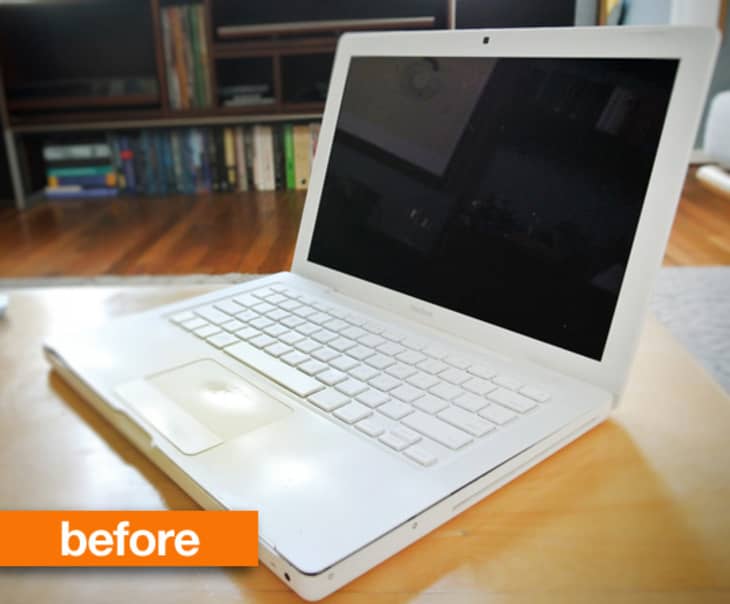
It was about two years ago, my partner Emily's 2006 MacBook laptop began showing the visible signs of being well used...very well used. The white polycarbonate front edges cracked after years of palm pressure and the heat discolored the once pristine white laptop to a yellowish hue most often equated with British dental hygiene. The MacBook was soon replaced, then packed away with the intention of one day being donated, but quickly forgotten tucked far into the recesses of our closet...
Then earlier this month, after rediscovering the box during one of my famous caffeine induced bouts of spring cleaning fever, I began thinking how much my mom would like a laptop. Nothing fancy, just something for checking her emails, watching YouTube videos, and surfing the internet from the comfort of her couch. I began planning and daydreaming of a MacBook reborn for my mom to use.

Both front sides of the top panel were cracked and splintering; Emily had used packing tape as a makeshift repair.
Of course, I didn't want to give my mom a worn down, cracked laptop like some bumpkin. But after seeing what a drastic improvement swapping in a solid state drive (SSD) made with my MacBook Pro, and also recognizing my mom needed mostly basic options, I believed this once beloved laptop had a few more good years in it yet. And so like the Bionic Man, I set out to rebuild the laptop: "We have the technology. We can make him better than he was. Better...stronger...faster." And hopefully all under the total price of a Benjamin.
To start off, I removed all the excess gunk which had accumulated inside and on the exterior. Magic Sponge does a remarkable job of removing stains, and if used carefully, can buffer out some light scratches on the exterior (do this very, very gently and not on high gloss areas). This process alone made the laptop seem worth salvaging, revealing a lot of the age marks were only skin deep.
Opening up the MacBook to access internal components wasn't too difficult, requiring nothing more than a basic computer tools kit and the patience to remove what seemed like a hundred tiny screws (this video walk-thru helped guide me through the process). I do recommend you keep a few pieces of packing tape or several magnets to keep these parts from going missing during disassembly, lest they find themselves hiding wherever it is your missing socks have also disappeared to.
Once open, using canister air is great for removing years of accumulated dust and debris that can find its way inside any computer (it's always both shocking and fascinating to see the accumulated matter that finds itself into computers).

I ordered about $80 in replacement parts, salvaging what was likely going to be donated or disassembled for random DIY projects.
The long in the tooth Intel Core Duo processor isn't upgradable, but I had two major components I could swap out easily: the hard drive and RAM. I maxed out RAM to a now decent 3GB, while replacing the pokey 5400rpm mechanical hard drive with a 30GB SSD drive. 30GB seems pretty minuscule storage wise, but considering my mom's computer habits, it would be years before she'd even use a couple gigabytes of storage (her Gmail inbox is another story altogether).
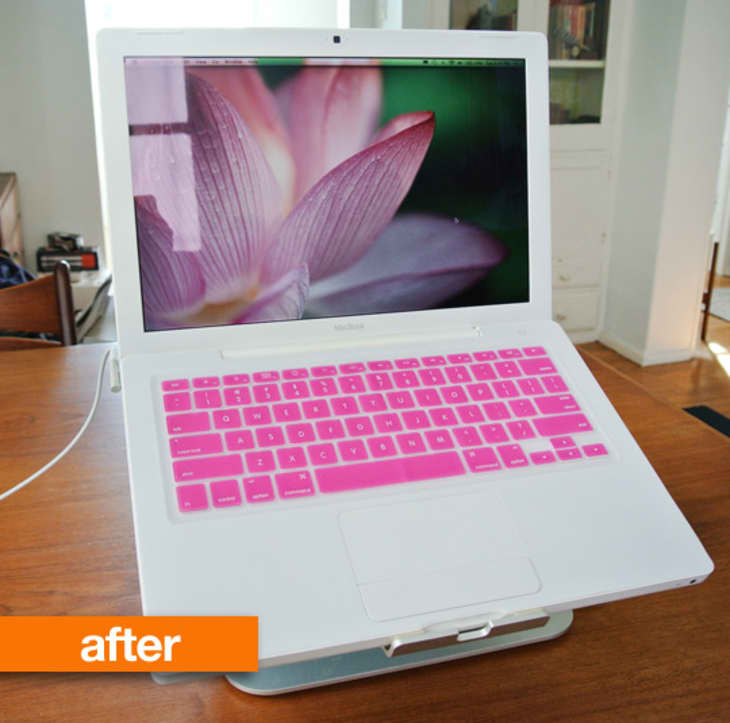
The laptop was going to be just for browsing online downstairs or in the backyard, not as her primary machine, so 30GB was not only spacious enough and much faster, it was very affordable at just $59.99. The additional RAM upgrade set me back a reasonable $31.99, and I also decided to add a little visual flair by ordering a hot pink keyboard cover, because mom has an affinity for bright pink.
Once all the internals were upgraded, it was time for the more unusual hardware repair. I had never replaced a whole laptop keyboard and touchpad, but a $42 replacement part was all it took to remove the previously cracked parts marring the appearance, and about half an hour later, I had everything closed back up, ready for a fresh install of OS X.
With OS X installed, the last few touches were some UI customizing specific to her computer habits (and eyesight). I know she primarily uses her current machine to read emails, drop into Facebook occasionally, check the weather, and maybe make a Skype call. I used the iPad as inspiration for optimal usability, bumping up the icons to a senior's eyes friendly 128 x 128 pixels size and centering them for simple access, removed the Dock and hard drive icon (which she never goes into and prevents any "whoops" changes), created a direct shortcut icon to her Facebook page, while setting up her browser to keep all downloads in one folder to prevent desktop clutter.
The results are a machine somewhere in-between a Mac laptop and an iPad; testing it out after upgrades were completed, the newly upgraded machine felt better than ever. With nothing extraneous installed on the machine, the upgraded SSD drive, maximum amount of memory inside, and a fresh OS install, the MacBook was faster and more responsive than when it was turned on the first time. I would dare to say it's twice the machine it was brand new.
Yes, there are still a few scratches here and there (easily disguised using a hard case, which is a possible future order), but at a glance, the once down-in-the-dumps portable is going to see new light as a very capabale secondary mobile device for my tech-savvy mom, whom I think will find this easier to type on and use than an iPad. I guess I'll find out this weekend when I take it over to her house and surprise her with the white and bright pink machine, but I'm happy knowing it took less than $100 to give the MacBook a new lease on life.

Ercol Bar Stool
This is fantastic. And good to know there are options for my macbook down the road.
Wow!!
This is a great story on how to give life to an older piece of tech.
Maybe the start of a whole new career or you !
Now there's a great idea! I wonder if I (and, by "I," I mean someone who actually knows what they're doing) could perform a similar resurrection on my six-year-old iBook, which has gotten really s-l-o-w. . . .
Awesome transformation! What was your mom's reaction?
I like this, well done. Did Mom like it? inquiring minds (aka. nosey people) need to know.
Very nice!
Lovely!
That's really great; Mom must be thrilled. I have a MacBook of the same vintage that I use as my back-up machine, and it is in similar physical condition to your mom's was pre-makeover. I put in the maximum RAM and a hard drive taken out of my MacBook Pro, and the older machine is zipping right along. I'll save your suggestions and might do a bit more.
Genius!
I'm still trying to wrap my mind around "I stopped using a functional MacBook because it stopped looking pretty". Hunh. I think you may have just blown something inside my brain, and I'm going to float through the rest of the day with this very same bemused look on my face...
"I stopped using a functional MacBook because it stopped looking pretty"
YAKKODOT: actually, that wasn't what was said or implied. My girlfriend only stopped using the MacBook after over a year of it being taped together with shipping tape after using it as her primary machine for years; the RAM was upgraded (this was before the 3GB RAM max upgrade was reported) but she was seeing extremely slow Photoshop performance, increasing crashes. Yet she was still using it diligently until a good friend of ours gifted her a barely used 13" Unibody MacBook, and it was an obvious and good reason to switch, not because it "stopped being pretty".
I know it's par for the course to assume the worst online, but seriously, this was about making something good out of a pretty outdated piece of hardware for anyone who works on a machine daily. And now it's seeing another chapter, still being used...
Did you use GeekTool to add the icons to the desktop?
ELLISB: I didn't use GeekTool, but maybe I should have considering the customization options. I just turned the dock off, bumped up the icon preview size to maximum and snapped them to grid, and set the hard drive icon to "off" in the view options. Not so geeky, but effective.
For others looking for clean up an old macbook, Apple has recognized that the keyboard/trackpad/palmrest on the white and black macbooks were prone to chipping and cracking. A trip to your local Apple Store and they will replace this part for free on any computer less than 5 years old.
Careful how you describe things: 'yellowish hue most often equated with British dental hygiene'.
Not nice.
Wow! Sign me up! I want one too. Another way to reduce, recycle, reuse. Thanks.
Lisa
Hi,
Maybe I missed something in the article, but how 59(ssd)+31.99(ram)+42(body) could be less than 100$ ??? And how about taxes + shipping ???
150$ as minimum...
Yes, I know, not so much diference from 100$, buy anyway it's confusing from beginning of article...
I couldn't get further than the unkind (and untrue) reference the British dental hygiene. Why would it be necessary to make a remark like that? Very disappointing.
Cool project. I really like what you did to simplify the desktop. This helps keep the expectations of the machine (given its age) in perspective while making it more appliance-like. Also the size vs speed trade off of a small SSD makes sense in your case as well. What OS and apps did you install (iLife? iWork?) and what is the amount of free space on the drive? Also, like a previous commenter, I am curious on the math & how it added up to <$100?
A couple of notes:
The top case (keyboard & trackpad piece as it is called) does often (but not always) qualify for a complimentary repair from Apple or an Authorized service provider if it has the cracking front edge. Just ask them nicely to check your serial number to see if it qualifies.
The RAM for Macs with integrated graphics is recommened to be paired (same in each slot) for video performance purposes. Running it unpaired reduces the amount of bandwidth available for the integrated graphics. Your specific workload will determine which is the better configuration. Ideally, try both!
If your machine cannot accept 4GB or more of RAM, I would not recomment Lion (10.7). Stick with Snow Leopard (10.6). The only caveat to this is no iCloud syncing (email works but anything else is questionable). For instance my 2010 MacBook with 2GB of RAM was fine in 10.6, but safari was essentially unusable in 10.7. A RAM upgrade solved this.
Nice project, but I echo some of the other commenters upthread in asking why you thought an article about a Macbook revamp needed a derogatory comment about British people's teeth. If I were inclined to rudeness myself, I might respond with a snarky comment about the American healthcare system... but I'll restrain myself.
For anyone else wanting to refurbish this particular MacBook, it's worth knowing that Apple will replace that cracking top case for free. (only once, but it doesn't have to still be under warranty.) Save yourself the $42. :D
Wow - where did the GSOH go? I'm British - proud owner of a nice set of white teeth but still get the humour - we are famous for the terrible teeth. True it's outdated but cliches came from a grain of truth! Far more interesting way to write than just stating yellowing stains - I totally got what the look that poor mac was sporting.
Personally I think you've done a really thoughtful, personal, successful revamp for your mum. Funnily enough in the UK it's Mothers Day this weekend and I reckon you just gained top spot as the best son :0)
CMKRD: thanks for the thumbs up, and mum did indeed love her new laptop (it helped I had kept all the original packaging and packed it all back up like it was new).
I guess I'd worked too long amongst Brits, who had always been the first to joke about tea-stained enamel as a playful tease amongst peers and friends. Apologies to anyone with less than stellar Hamsteads, British or otherwise.
GWIMBY: Happy to reply to your feedback/comments, as it gives me an opportunity to clarify and explain some of the decisions (and mistakes) made:
1) I didn't install any additional applications, it's a stock OS X machine. The reason being is my mom doesn't require any additional productivity or entertainment applications except those installed off the OS install. My 60-something Korean mom only asked I create a shortcut to the weather report, her Facebook page, and the NASDAQ.
2) The "under $100" is considering most people won't (hopefully) require spending the $41 to replace the top panel like I did; the SSD and RAM are the real stars of this upgrade and can be purchased for under $100 (though, I suspect readers here upgrading their own machines will want/require at least want a 128 GB drive).
3) Top case: I remember contacting Apple years back about a replacement, in which they replied, that for some reason or another the machine didn't qualify (mind you, this was years ago, so all I remember was "no"). I have to admit, after reading about other commenters being able to procure a replacement directly from Apple, even out of warranty, makes me wonder if I should have tried a second time, with more insistence. When I began this upgrade project, I didn't see the part replacement listed amongst Apple's current Exchange and Repair Extension Programs page, so it didn't even occur to me to inquire again; on the bright side, I learned a lot more about the internal workings of the MacBook through taking things into my own hands. But I hope my loss is another's gain, saving others the extra $41.
4) You're 100% correct about ideally pairing RAM (both in spec and also in brand); it was a detail I considered over and over before going with the 2+1 setup, deciding the performance hit was likely minimal considering my mom's computing needs and habits (it was admittedly a small cost cutting decision).
5) Right, yet again. The machine was installed with Snow Leopard, everything stock. 10.6 is remarkably stable and responsive on the MacBook, and I came to the conclusion the extra $29.99 Lion upgrade would have mostly gone unnoticed comparatively. This machine probably will never see another OS or hardware upgrade (alas, my mom caught sight of my new iPad and seems keen on the idea of having one "at a later time").
Nice job!
Love this! I especially like how you set up the desktop for easy use. I actually have two old macbooks sitting around waiting to be used for something... I think I might have to rehab one for my son to use after seeing this post.
I think the most important key- to both the article and the comments-
YOU COULD HAVE SAVED LIKE 50 BUCKS !!
The apple keyboard/top case cracking is a common issue and apple has been great in replacing them. I took my macbook in and got a brand new top within 24 hours for free. I also sent a friend in to do the same. WOO! Free Fixes are the best.
& more proof-
"The top case (keyboard & trackpad piece as it is called) does often (but not always) qualify for a complimentary repair from Apple or an Authorized service provider if it has the cracking front edge. Just ask them nicely to check your serial number to see if it qualifies."
"For anyone else wanting to refurbish this particular MacBook, it's worth knowing that Apple will replace that cracking top case for free. (only once, but it doesn't have to still be under warranty.) Save yourself the $42. :D"
overall i think this was a great idea and a great post! i might actually give my ol' mac to my mom one day.....one day.
My husband is going to be disappointed when I show him this, he's been looking forward to buying a new laptop for months but I know that he won't be able to resist this ...
Gregory: "I know it's par for the course to assume the worst online, but seriously, this was about making something good out of a pretty outdated piece of hardware for anyone who works on a machine daily. And now it's seeing another chapter, still being used..."
You know what, you are absolutely right, and I appreciate the reminder to be kinder online, and not to assume the worst or go straight for the snark. Thanks for calling me out on being a brat, sometimes I need that!
Hi Gregory,
Here's a preventative method that you might like to employ.
The cracks along the front of MacBooks were caused by mega strong Magnets located in the top lid used for closing it. Although Apple might replace some for free, the cracks will happen again. When a user closes the lid and then opens the lid quickly, it puts a strain on that area, snapping the thin 'shelf' of plastic. Apple used far too strong a magnet and as the MacBooks come in to me for Keyboard Top cover replacements I carefully peel away the front bezel from the screen top with a thin opening tool revealing the magnets. I then next 'hook' them out. Push back the bezel and your Keyboard Top cover should last for ages.
Closing still works as the weight of the lid is heavy enough.
If you don't feel like doing this, just remember to close and open Macbook lids 'slowly'.
Hope this makes sense.
After spending a considerable amount of time in a few different parts of Britain, I can't say I am offended by people talking about bad British teeth, but I'm not really sure why you would put that remark in this article. It wasn't really funny, it didn't have anything to do with the rest of the article, and was just unnecessary. Bad writing, but not offensive.
As a side note, I found it refreshing that, in Britain, there was not the expectation that you waste lots of time and money "fixing" perfectly functional teeth to be straight and bright white. I think the American obsession with perfect teeth is actually slightly pathetic, and the fact that it does seem to be slowly spreading to Britain, where more people are starting to get braces, pretty depressing.
Anyway, to the topic at hand, my roommates computer is a lot like this one and has been busted in our livingroom for months. I wonder if she would let me have it to tinker around with...
I am british i read this and i just thought oh aha..and read the rest..but i remember more what was written about the laptop and not the "offensive" comment. All it made me think of was of the toothpaste adds i see on tv and how much i hate dentists. Personally i think this has been made a mountain out of a molehill and its time to move on...there are worse things going on in the world.....
This is really cool! It's amazing what you can do with a few replacement parts. Makes me think about my current laptop a little more!
Good job! Very smart decision to upgrade and clean up your mom's MacBook by buying additional memory and some accessories rather than to buy a new and expensive laptop. Less cost..right?
wicked!!! adore the pink and youre awesome for doing all that work ^^
As a techie Mom, this was a wonderful thing you did for your mother. I don't even know you and I am proud of you...from one Mom to another, your Mom must have been thrilled. What a wonderful daughter you are! Thanks for sharing, I'm sending this post to my daughter!