
I Tried 10+ AI Design Tools to Make Over My Kitchen: Here Are My Top 3 Picks
Whether you’re a first-time homeowner or a literal pro, you’ve likely had the nerve-wracking experience of standing in a room, crossing your fingers, and hoping a paint color you agonized over doesn’t look completely different once it’s actually on the walls. Interior design can feel like one giant leap of faith, as scale, light, color, and proportion can all look wildly different in real life than they do in your head.
Designers have illustrators and CAD experts on call. The rest of us have been left to Pinterest and prayer — until now.
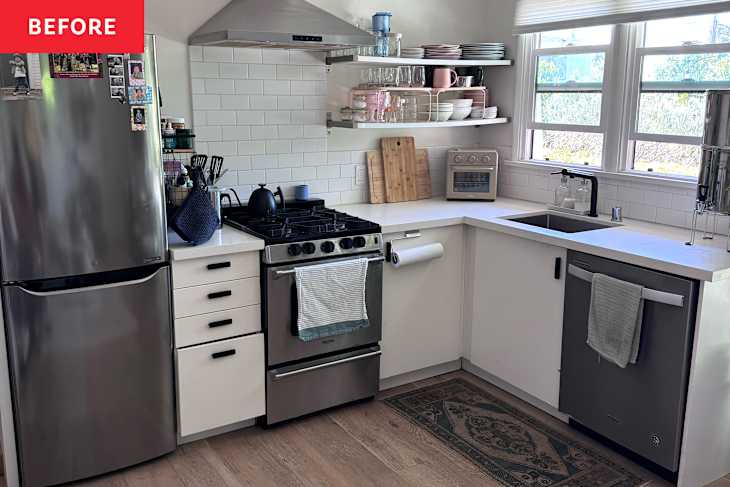
AI interior design tools have been quietly multiplying, promising to turn a photo of an under-decorated or dated space into a mood-board-worthy rendering in under a minute. Bold claim, huh? I decided to put the 11 most popular free ones to the test. I used the same photo of my kitchen and typed in the same prompts, and received wildly different results.

After using them all, I’m highlighting three different options — the ones I consider to be the best of the bunch. The key to using AI for a kitchen is to use services that provide actual photographic results; mockups are crucial for a kitchen makeover, and these three services all provided useful images. Follow along as I highlight my honest breakdown of three top AI kitchen design tools below.

VisualizeAI: Best Overall AI Kitchen Design Tool
The most user-friendly tool I tried was VisualizeAI. It works by uploading an existing photo, sketch, or floor plan into a straightforward interface and then layering in your instructions. You pick your room type and style from a drop-down menu — the options are genuinely extensive, from farmhouse to cyberpunk to cottagecore — and then add text-based instructions to fine-tune the result.
You’ll need to use your prompts wisely, though. Your first three renders are free; after that, it’s $17/month for 150 renders.

I ran three carefully chosen prompts through it using a photo of my white, modern kitchen. There’s nothing wrong with my kitchen, per se, but the space could use a sprucing up. More shelves, maybe. Layers of color or texture, definitely.
I asked for different styles to test VisualizeAI’s range: one bold and eclectic, one retro and playful, one serene and Japandi-inspired. All three had one shared requirement, though. Each update had to be renter-friendly, so no demolishing walls, altering appliances, or making any changes that my landlord would not approve of.


The results were a mixed bag of interesting and unhinged. Maybe it’s the minimalist in me, but I found that the simpler the request, the more on-point the results were. VisualizeAI took some creative liberties with the bolder prompts.
One render quietly removed the refrigerator, while another nixed my window. Neither of those things are happening. But as a jumping-off point for ideas — a new window treatment here, a peel-and-stick backsplash there — it works.
Pro tip: Don’t close any browser tabs, and be patient; images take a couple of minutes to generate, and this service doesn’t forgive impatience.
VisualizeAI Pros
- Huge range of styles, including genuinely niche aesthetics.
- Includes abilities and prompts to exclude details and styles, which is a surprisingly powerful feature.
- This service also handles visualization of product design, like custom furniture or decor.
- Beginner-friendly; no manuals required!
VisualizeAI Cons
- No explanation of any decision making, including details changed or how to re-create it.
- Image quality is decent, but not photorealistic.
- Occasionally ignores specific constraints (RIP to my fridge).

RoomsGPT: Fastest AI Kitchen Design Tool
RoomsGPT is the most frictionless experience of the bunch: There’s no sign-up required, you have 10 free credits per day, and it has a simple interface. Upload a photo, pick a style, and go.
There are two modes available to users: “interior planner” or “custom brief.” For the interior planner, you’ll pick from over 60 design styles (traditional, rustic, retro, gothic, and many more), then upload your photo and press “generate.”
The custom brief is exactly what it sounds like. You type in a description of what you want, or what you specifically don’t want. If the results aren’t your style, hit “regenerate” or “new design” to try again.

I played around with both, but I quickly started to wonder if RoomsGPT had even read my prompt. I specified renter-friendly updates only — no structural changes — but the tool proceeded to flip the entire room, relocate the window, and swap out the appliances. I hit regenerate more times than I’d like to admit, cycling through different styles, like modern, Parisian, and a few others.


The results were wacky, occasionally inspired, and almost never what I actually asked for. On a positive note, it showed me some genuinely appealing hardware options and open shelving ideas. On a less positive note, it painted my floors yellow in one rendering and added a wood-plank ceiling in another — charming, perhaps, had I not explicitly said I was looking for rental-friendly solutions.
I tried going simpler, with no custom prompt, instead just setting the style selector to “hygge.” The results were downright laughable. My kitchen was replaced with a wood-burning fireplace, a leather couch, and a blanket hanging dangerously close to a lit candle. I don’t think the tool’s algorithm even registered that it was redesigning a kitchen.

That said, the chaos is kind of the point? If you want to be surprised and amused, and occasionally baffled, this tool delivers. Just don’t come in with strict requirements or thinking this will replace a trained interior designer. It won’t.
Pro tip: The regenerate button is seriously fun. Treat each result as a starting point, not a final answer, and you’ll get more out of it.
RoomsGPT Pros
- Fast results with minimum downtime.
- No account required; simply sign on and get working.
- 10 free credits daily.
- Fun and low-stakes to play with if you’re unsure of which direction to go in.
RoomsGPT Cons
- Frequently ignores custom prompt instructions.
- Lowest image quality of my test.

HomeVisualizer: Best Paid AI Kitchen Design Tool
After the randomness of RoomsGPT, using HomeVisualizer felt like a breath of fresh, well-designed air. This is the grown-up in the room: The most realistic AI tool, most responsive, and, frankly, my favorite tool of the bunch.

Where the other tools occasionally seemed to skim my prompt, HomeVisualizer actually read it — no flipped rooms, no vanishing appliances, no inexplicable fireplaces. I asked for renter-friendly updates only, and that’s exactly what I got — bold accessories, layered textiles, and a serious glow-up that stayed firmly within the bounds of what my landlord would allow.

The before-and-after scroll feature, which lets you drag between the original and the render side by side, is genuinely satisfying and makes it easy to clock exactly what changed.


You can upload your space plus up to 12 inspiration images, which is a game-changer if you’ve been quietly hoarding a folder of saved Instagram posts. There’s also a “surprise me” button for when you want to hand over the wheel entirely (an exciting option if you’re clueless as to where to start!).
A few logistical things to know: You must create an account to use it, and if your image upload keeps failing, try downsizing the file before you troubleshoot anything else. The first three renders are free, then it’s $12 per month for 250 renders, which is a solid deal if you find yourself going back to it regularly.
Like all AI tools, HomeVisualizer rewards precision. The more specific and design-literate your prompt, the better the output. Vague requests get vague results. If you’re unfamiliar with interior design, spend a few minutes with the other tools first to get a feel for what kind of prompts generate interesting results — then bring that knowledge here.
Pro tip: Upload your own space plus a few inspiration images together. The combination of reference points produces noticeably more tailored results than a text prompt alone.
HomeVisualizer Pros
- Most realistic renders provided, with the clearest images to use as inspiration.
- Actually follows prompt instructions with traceable results.
- Before-and-after scroll feature makes it easy to compare changes made.
- Upload up to 12 inspiration images alongside your own space.
- “Surprise Me” feature that takes initiative for you if you’re unsure of where to start.
HomeVisualizer Cons
- Requires an account to use.
- Large image files may cause upload failures.
- Requires a more precise command of design terminology for best results.
The Bottom Line
Regardless of which AI tool you may choose to use to create inspiration for your kitchen makeover, I realized that an AI tool won’t always be sufficient for the job. One thing I kept wishing I saw from all of the AI tools was an explanation of their work.
I’m clearly a words person, and I wanted all AI tools to tell me what it changed in my existing kitchen — and why. A quick bulleted breakdown of “here’s what I added, here’s how to get the look” would have made any of these tools infinitely more useful for actually acting on the inspiration — especially because image quality can be far from perfect. In the end, I’d say use these AI tools to get you started … but nothing replaces a real contractor and interior designer when it comes to overhauling your kitchen.
Design Defined
Never miss the style inspo and recommendations you crave with Design Defined. Follow along each week as our Home Director Danielle shares the best style advice, latest trends, and popular decor finds you just can't miss.