
I’m a Design Consultant, and I Used AI for My Clients’ Dining Room Makeover. Here’s What Happened.
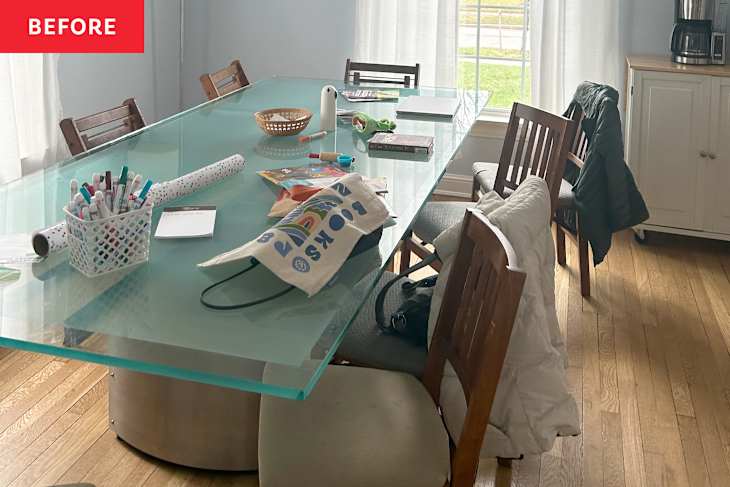
As a design consultant, I usually create moodboards for my clients to give them a sense of how their spaces will feel once complete. I’ll admit: I’ve been somewhat wary of AI in the past. But now, with AI design programs making it so easy to render full spaces, I knew I had to try it out. So when a couple from Cleveland, Ohio, reached out for a consultation (via my business @DesignFix.cle), I decided to put these programs to the test.
The client’s vision was equal parts mid-century modern and contemporary, which was slightly more complicated than my moodboards could handle. The goal of this project was to take a ho-hum blue dining room and transform it into a room with personality — but nothing too glam or overly bold. At the very least, the original dining room’s too-large table, out-of-date light fixture, and dusty old valances would have to go. I decided to start with two out of the three top AI design tools, according to Apartment Therapy: HomeVisualizerAI and VisualizeAI.

My First Attempt Leaned Way Too Mid-Century
The interface of HomeVisualizerAI was easy to use and felt incredibly intuitive. The input is categorized by type of room, so I selected Dining Room. My first custom design request was pretty basic: I instructed the program to lean into a mid-century modern vibe. I told it to add some dramatic retro details like wainscoting, whimsical wallpaper, and a painted ceiling — and I was wowed by the result.
It wasn’t a good “wow,” unfortunately. The room looked like something straight out of a 1960s sitcom set. Instead of nostalgia, it gave my client nausea. “Literally wrinkling my nose in disgust,” she said. The bold color palette and geometric wallpaper made it feel like a dated basement hangout space rather than the fresh, personality-filled dining room we were after. I realized I should probably have specified a more contemporary color palette because an aqua ceiling just wasn’t the vibe. I was also disappointed that the program didn’t replace any of the furniture, window treatments, or accessories. Clearly, it needed even more direction next time.

Specifying a Color Palette Set the AI on the Right Track
The second time, I put my writing skills to work with a new, more specific prompt: I typed “Mid-century modern room design. The color scheme should be Caledon green and blue or something similar. I would like to add wallpaper and a coordinating ceiling paint. The trim should be painted. Add an orb glass chandelier in the 1960s style. The dining table should be rounded in a white oak with wishbone chairs and chartreuse upholstery. Create a James Bond-style bar cart. Add art to the walls. Window treatments should be sheer curtains.” And it was a huge improvement, indeed!
Aside from inexplicably removing the second window for some reason, HomeVisualizerAI seems to be able to follow specific directions quite well. This version perfectly balanced mid-century modern details with contemporary silhouettes. I loved how the wallpaper perfectly picked up on the color of both the chartreuse chairs and the deep blue ceiling. My client was pleasantly surprised as well. “It’s fun to see an example of the ceiling painted a bold color,” she told me. “I didn’t know I could be open to that.”

Next, I Tried Visualize AI For a More Specific Style Match
I then switched gears to Visualize AI, which lets you choose a style after uploading your image and selecting the room type. I liked that the tool has a visual carousel to give the user a better sense of what these options may look like, should you need a reminder. Since mid-century was the main directive here, that was where I started. I made sure to add additional instructions: “Include blue walls with a non-busy wallpaper pattern or slight texture and a peach ceiling. The table should have a fluted base with bench seating. Add a rug under the table and a buffet with shelving above. Abstract and retro art on the walls. Breezy window treatments. Interesting lighting in brass and glass.”
The result was, in my opinion, just okay. The design wasn’t particularly surprising or visually interesting. I liked how the peach ceiling looked, but the paint color on the walls could have been more complementary. The client was not a fan of the geometric rug and art but liked the bench seating and other furniture pieces. That result also pushed me toward sourcing real furniture instead of relying on the rendering alone, so I browsed Article, since the brand is known for its Scandi and mid-century modern designs. I stumbled across the Jens Bar Cabinet, and my clients loved it. So while the overall design was underwhelming, this rendering was helpful in narrowing down specific furniture.

What I Learned From Using AI Interior Design Tools
My main takeaway from this experience was that AI needs expertise and guidance to be effective. It certainly can’t completely replace the role of a designer or consultant. It’s not enough to ask for a particular style or furniture silhouettes — it needs direction and specificity. But it can definitely help clients more easily visualize the finished space. “I appreciate the ability to visualize a space in ways that a traditional concept board simply can’t,” one of the clients told me. “The ability to see how colors, patterns, and textures can come together to transform my space is really inspiring and helped me define the direction of the project.”
I do think HomeVisualizerAI and Visualize AI are both useful tools when you want to play around with concepts and different styles, but these tools don’t have the capacity for refined taste or nuance. These AI tools can point you in the right direction, but if you don’t know how to prompt them, it’s hard to end up with a visually appealing result. Some of the most interesting designs come from combining unique pieces, often from different historical periods, and I don’t think these AI tools know how to do that in a seamless way. They also lack the ability to create the layered color palettes and unexpected combinations that make a space feel truly designed rather than generated.