
Get Inspired by the Ways These Real-Life WFH Setups Make Work Easier
Most of us are probably settled in our WFH spaces by now, but that doesn’t mean there’s no room for improvement. Whether you have a dedicated room or just a corner, a few intentional tweaks can instantly improve your office area’s style and productivity.
But if you’re moving? Congrats – you get the benefit of a fresh start, and the opportunity to totally reimagine your home office! You also have the chance to get connected like never before with T-Mobile 5G Home Internet. It’s the fastest 5G Home Internet with a price that won’t change for five years, guaranteed.* Whatever kind of WFH refresh you’re looking for, this real-life inspiration from our Apartment Therapy House Tours archives can help you get there.
Tip #1: Invest in a good chair
You wouldn’t walk around all day in uncomfortable shoes, so don’t spend your working hours in an uncomfortable chair! A slim, breathable ergonomic chair, like in the cheery modernist office above, promotes good posture while you work. You know the drill: both feet on the floor, knees at 90 degrees, screen at eye level. You can also consider gaming chairs and other features, like wheels and footstools, that make sense for your space and your body. The right chair will pay for itself every day, and will last a lot longer than even the best comfy shoes!

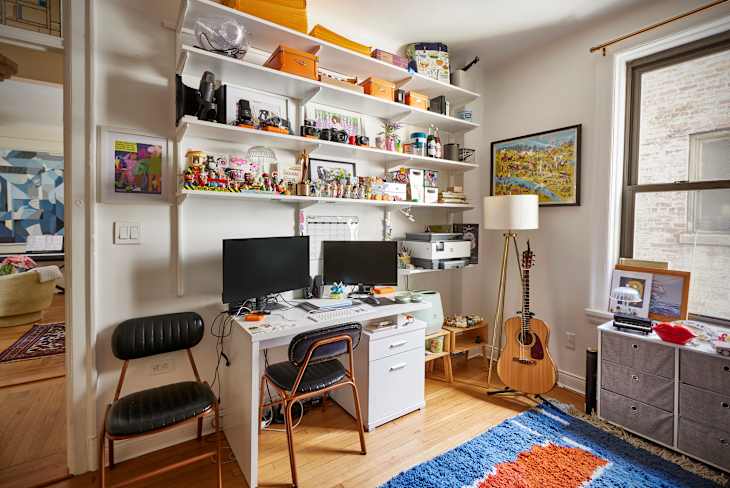
Tip #2: Have a dedicated desk (not the sofa!)
We promise, you have room: This ladder-style desk is squeezed into a 400-square-foot studio! Its slim footprint provides just enough space for a monitor and keyboard, plus additional shelving above. You can scale up according to your space — we love a large L-shaped desk for bigger setups — but the most important thing is a spot that’s solely for work. It will make every day feel more productive and help you set good boundaries when the workday is over.
Tip #3: Get fast home internet
Freezing on a video call while making a weird face? Couldn’t be you. T-Mobile 5G Home Internet delivers exceptional speeds all day long, so you’ll never become an office meme. With free same-day delivery powered by DoorDash** and a simple 15-minute setup, you can get online as soon as you move in. T-Mobile offers the fastest 5G Home Internet***, for connections you can rely on — even during that big presentation.

Tip #4: Set up task lighting
Task lighting gives your eyes a break and your desktop a style boost. Consider it an opportunity to go bold on color or incorporate a different aesthetic: This chic Parisian studio does both, with a banana yellow cantilever lamp and a vintage-inspired banker’s lamp. Desktop or wall-mounted, a focused light source will reduce eye strain and impart a warm glow that makes your office area feel more polished and comfortable.

Tip #5: Don’t forget to add your personality
You know what they say about all work and no play. Once you’ve addressed your practical 9-to-5 needs, make sure that your WFH feels like you! Whether that’s a maximalist use of wallpaper, a gallery wall of your favorite prints, or just your favorite scented candle, you’ll feel way more inspired when your workspace reflects all the style and individuality you love when you’re off the clock.
*Guarantees mo. price of fixed-wireless 5G internet data for accounts on eligible plans. See exclusions & details at T-Mobile.com.
**For most internet-eligible customers; see if it’s an option during checkout.
***See details at T-Mobile.com. Fastest 5G Home Internet according to Ookla® Speedtest Intelligence® data, 2H 2025. All rights reserved.