
I Have Carpal Tunnel, and This One Change to My WFH Setup Made My Wrist Pain Disappear (It’s a Game Changer!)

This year, I’m all about comfort. The one area of my home getting a major cozy upgrade? My office. I’ve written recently about how I finally moved into a space that allowed me to create the office of my dreams. While part of what makes my office a dream office is fun decor and lighting, the heart of it is functionality and ergonomics. From an ergonomic office chair to an adjustable foot rest, I’ve made some great upgrades lately, but none as great as my most recent one.
As a lifelong writer, I have the scars to prove it — namely carpal tunnel syndrome in my right hand. When my carpal tunnel starts acting up, it can become debilitating. As a result, I take some measures to prevent a flare-up, namely wearing a brace as needed and doing some doctor-recommended wrist exercises. However, the thing that’s made the biggest difference in my day to day has been switching to an ergonomic mouse, namely the HP 920 Optical USB Wireless Ergonomic Mouse.

What is the HP 920 Optical USB Wireless Ergonomic Mouse?
If you’re looking for a mouse to help with wrist pain, look no further — this HP pick is the best of the best. Unlike a traditional mouse, this one features an upright design, allowing your hand and wrist to sit in a more natural (and comfortable) semi-handshake position for a pain-free workday. Not only that, but it also comes with a detachable wrist rest for added support.
Aside from the impressive ergonomics, this pick is also intelligently designed from a tech standpoint, with a wireless design (allowing you to connect to up to three devices at a time), five programmable buttons using the HP Accessory Center, and a rechargeable battery that offers up to 16 weeks of power (just be sure to toggle that off switch at the end of the day).
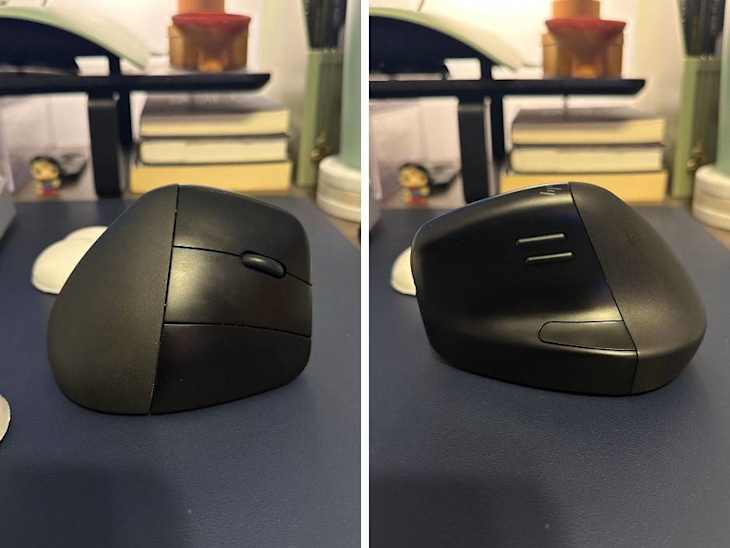
Why I Love HP’s 920 Optical USB Wireless Ergonomic Mouse
Let’s get the obvious out of the way — yes, this mouse does take a moment to get used to. However, it’s much quicker to adjust to than you might think, and I chalk that up to it truly feeling like a more natural way to place your hand. Since getting this mouse, I have not had a flare-up (something rare for me in the winter) so it’s safe to say it works. I never noticed how much I was tensing my hand with a traditionally shaped mouse that now when I do use one, I can’t help but say to myself, “How (and why) did I use this for so long?”
Since incorporating this ergonomic HP mouse into my workday, I have not been able to shut up about it. From friends and family to coworkers and other writer friends, I’ve told everyone about the genius that is this mouse, converting many in the process. Now, it’s your turn, dear reader. Here’s to a more comfy (and ergonomic?) 2025.
Buy: Walmart, $79; HP, $99.99; Amazon, $64.99
Sorry, this list is no longer accepting subscriptions.
Feel free to subscribe to our other emails.