
I Finally Found a TV That Works in My Too-Bright Living Room
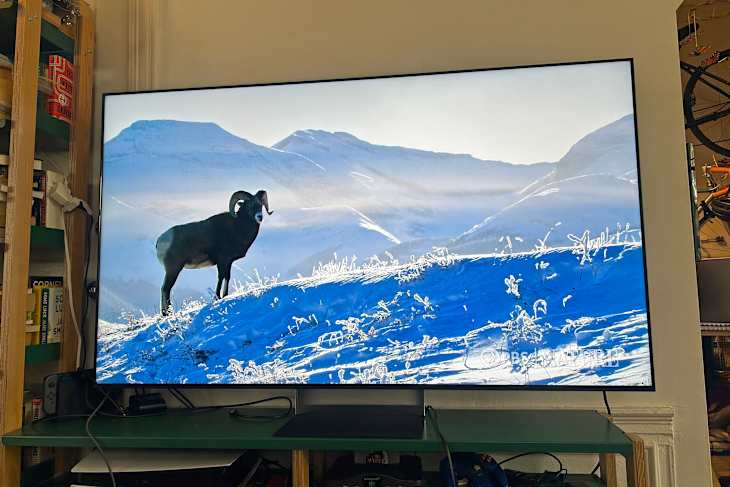
I love a movie night at home, but I love a movie day even more — a Saturday or Sunday afternoon spent in my apartment, in front of my television, lazing the day away. Unfortunately, because my living room is one of the brightest rooms in my house (with three windows across two walls), movie days can be harder to pull off because of the glare of the sun on my television screen. Even when I close all of my curtains in my house and turn the lights off, the glare on the TV can make an entire half of the screen almost impossible to see — even if I turn up the brightness or the contrast.
That’s why I was excited to check out the Sony 65” Bravia 9 II TV, a television that Sony says “brings the cinematic experience home” and touts as the first true RGB LED television. While the visual clarity of the television is exciting (as is the big enhancement to my movie days and nights), what appealed to me most was that it promised to be anti-glare and to finally keep the screen glare at bay during the daytime. On these notes, this television truly delivered, above and beyond my expectations. If you have a truly bright living room like I do, this unit is the one for you.

A Quick Look at the Sony 65” Bravia 9 II TV
- RGB LED display type with 4K resolution
- Powered by Google TV powered by Gemini
- Powerful screen resolution: the high dynamic range format includes HDR10, Hybrid-Log Gamma and Dolby Vision
- Full-array local dimming backlight
- Refresh rate of 120HZ and XR Motion Clarity
- Works with Amazon Alexa and Google Home
- 4 HDMI units
- Built-in speakers that are shockingly powerful
- Comes with mirage stand
- Comes in 65”, 75”, 85” and 115”
- Compatible with Apple AirPlay
Design Features that Stand Out
The television was very easy to set up. All I had to do was get it mounted onto the mirage TV stand, which is made with a semi-reflective glass to make the television look like it’s floating, even if you don’t mount it. I was able to do much of the setup myself, which was no small feat as I am notoriously home-projects averse (nor am I a huge tech head). Because I didn’t mount it, the only time I needed help was when I had to slip the television into its new stand and move it onto the console in our living room. My husband and I both set up the cords, our Samsung surround-sound system, and all of our apps and his video game consoles in less than an hour. Then, it was off to the races (with the exception of some funkiness on the audio end, which I will detail below). The four separate HDMI inputs mean you don’t have to make hard choices about what systems you want to set up — we easily set up the PlayStation 5 and the Nintendo Switch, as well as the speaker system. The mirage stand that goes under the television, although mostly obscured by our soundbar, looks really nice as well; it’s ideal for someone who isn’t interested in mounting a television (aka me).
The television is quite thin, and the RGB LED display with 4K resolution is immediately apparent upon turning the television on. The internal speakers are shockingly powerful, and although we already had a surround-sound system, there’s absolutely no need to do that. It’s ready to go right out of the box.

How It Performed
First, what I loved about this television: The screen quality is totally bonkers. The anti-glare tech (which can cost you) is really, really effective. We’re able to watch dark nighttime scenes in the middle of the day in our bright, sunny apartment and see everything in really high quality. There Will Be Blood looked absolutely stunning on this television; the inky blacks of the nighttime scenes at the oil field on fire were impossibly deep and varied. At night, this television performs even better, and I’ve found myself putting on more and more movies from blockbusters like Jaws to quiet indies like Sideways just to see how the TV renders them. And while we have a soundbar, a surround-sound system, and a subwoofer, the internal speaker system is shockingly high-quality — you don’t need to make your setup as complicated as ours at all to hear everything well. And you might not want to, because the audio setup did prove to be wonky. Our surround-sound system is Samsung, and it was initially easy to set up — especially when doing basic streaming like watching Prime TV or Apple TV. But it became a bit more complicated with video games — particularly PlayStation ones. When my husband turned on his PlayStation, planning to use the HDMI-cable-to-soundbar setup, it yielded an audio synchronicity issue that took us some time and tinkering to resolve and made gameplay suffer in the meantime. Ultimately, we found a workaround by using a Toslink cable for the sound bar instead of the HDMI cord. This took us a bit of time to figure it out. However, if you don’t play video games or have an external audio system, this is not an issue you should expect to run into.
The television I had before I set up the Sony Bravia was not a cheap television by any means — and it was the same size, also 65”. I’m glad that this was the case because it made it easier to focus on the smaller details, rather than be blown away by a massive upgrade. Even so, there were clear and immediate differences between my old television and this one. The first, and most important, of which is that the screen quality and anti-glare tech really is astoundingly great. It’s leaps and bounds more impressive than what I have experienced before. The RGB LED television, which Sony says “drives three-color LEDs independently for unprecedented color volume, precise color gradation, and a significantly wider viewing angle,” displays different shades of black and color so masterfully that for the first time in years I feel like I’m not having that experience where you watch an under-lit HBO television show (*cough Game of Thrones cough*) and wonder what the heck is going on. The colors beyond black are also vibrant and more accurate than what my old television was capable of broadcasting. We can watch anything we want at any time of day — a first for us.
What we love
- Incredibly high screen quality
- Minimal to no glare during the brightest hours of the day
- Easy to set up
- Impressive internal sound system
Good to know
- If using a soundbar on the PlayStation, consider getting a Toslink cable to limit audio/visual delay
- Although you can run Apple TV, you have to rent the movies on your phone because of Google/Apple issues
Should YOU Buy the Sony Bravia 9 II TV?
If you are looking for truly mind-blowing screen quality and anti-glare technology that actually works, and a TV with an audio system strong enough that makes the whole experience essentially plug-and-play, then this is the television for you.
We’re able to watch everything we want, whenever we want, with high visual fidelity. However, if you’re someone who is particular about your audio setup or are plugging in several gaming consoles to your television, consider using only the internal audio system or being prepared to tinker for a minute to find the right setup. It was worth the effort for us.
Buy: Sony Bravia 9 II TV, 65”, $3,599.99